Find what’s costing you
time, jobs, or money.

We find where work gets stuck and get your website and business tools working together. We start with what you have, then connect or build what’s missing.

How Meridian finds and fixes the gaps.

38 seconds · Silent film · Illustrative workflowOpen full size
Read what we do
  1. What’s costing you time or customers? That might be missed inquiries, repeated entry, or follow-up that slips.
  2. Find what’s causing it. We follow a real task through the tools and people involved.
  3. Start with the software you already have. Your existing tools may support the feature. We check what needs configuring before adding anything.
  4. Connect the missing steps. Configure existing features, connect missing handoffs, or build a focused tool. Requests, schedules, cost reviews and drafts grounded in approved sources are examples.
  5. Test it with your team. A fresh website test reaches the work queue with matching details and someone assigned to follow up.
  6. Show your team how to run it. Clear ownership, a practical walkthrough, written instructions, and support with an agreed scope.

What we can fix

  • Get inquiries to the right person.Send website requests into the same place you track calls.
  • Enter job details once.Carry the same information from the quote to the schedule.
  • See what a job actually made.Compare the quote with what you spent on labor and materials.
Try a working demo
Explore a specific exampleScheduling, stock, customer requests and job costs

See the work in detail.

Illustrative examples of what we can connect or build.

One job, from request to quote.

See how Meridian traces a missed website inquiry, connects the form to the office’s job queue, and checks the fix.

39 seconds · Silent film · Fictional service jobOpen full size
Read the walkthrough
  1. Find the missed request. A homeowner’s inquiry reaches a shared inbox but never makes it to dispatch.
  2. Connect and test the form. Meridian routes it into the existing job queue. A second test reaches Casey with a clear next step.
  3. Keep the job together. The office books the visit, the crew confirms access, and the last blower motor is reserved for this job.
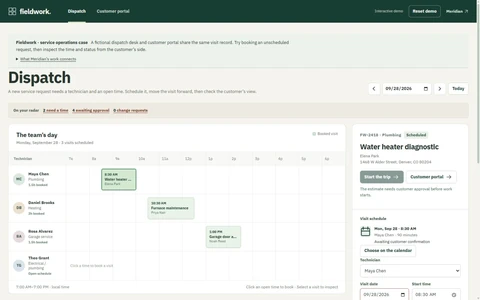
  4. Catch the low quote. The diagnosis puts costs at $455. The $480 draft would leave $25 before overhead. The owner reviews the draft and approves $640, leaving an estimated $185 before overhead.

Mockup 1 of 5 · Fictional service visit

One job. Three dates.

  1. The office, crew and customer each have a different date.
  2. Meridian checks which record is current and connects both views to it.
  3. The office saves Friday once. We check the crew sheet and open the delivered confirmation.
27 seconds · Silent filmOpen video

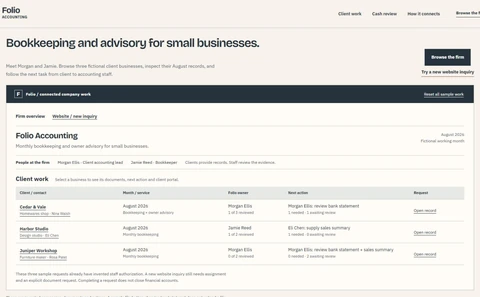
Mockup 2 of 5 · Fictional retail shop

One item left. Two checkouts.

  1. The website and counter both show the last lamp as available.
  2. Meridian makes both checkouts reserve the lamp against one count.
  3. The website reserves the last lamp. The counter sale stops.
19 seconds · Silent filmOpen video

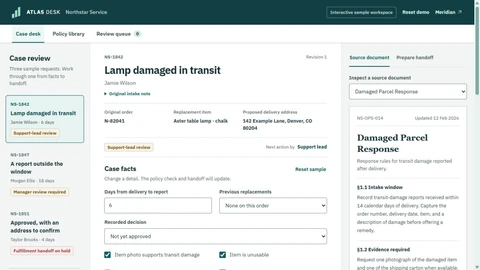
Mockup 3 of 5 · Fictional cleaning service

Who saw the crew update?

  1. The customer called after the crew’s job sheet was printed.
  2. The office posts the new entrance instructions to the crew’s job sheet.
  3. Rosa confirms. Lee hasn’t replied, so the office knows who to call.
19 seconds · Silent filmOpen video

Mockup 4 of 5 · Fictional service job

From quote to actual job costs.

  1. Compare costs. The draft price is $480. With the new costs, only $25 would be left before overhead.
  2. Check the owner’s rule. They want at least $100 left, so Meridian’s check holds the draft for review.
  3. Review the price. The owner approves a revised quote for $640.
  4. Check the finished job. The logged labor and materials leave $110 before overhead, compared with the $185 estimate.
30 seconds · Silent filmMeridian compares the $480 draft quote with the original $310 estimate and the updated $455 estimate. The owner sets a $100 minimum before overhead. Meridian builds and tests the check. The original estimate leaves $170 and passes. The updated estimate leaves $25 and goes to the owner, who approves a revised $640 quote with an expected $185 before overhead. The job closes with $330 in labor and $200 in materials, leaving $110 before overhead. The actual cost is $75 higher than estimated. Open video

Mockup 5 of 5 · Fictional sign shop

Get a website inquiry answered.

  1. Send a test. It reaches the website inbox. The office never sees it.
  2. Connect the form. Meridian sends it to the office queue and gives Maya a reply deadline.
  3. Check the reply. Maya answers, and the owner can see her reply on the same record.
21 seconds · Silent filmMeridian sends a test sign inquiry through the website and finds it in a separate inbox. There is no record in the office queue used for phone calls. Meridian connects the form to that queue and assigns Maya to reply by 5. Maya replies at 4:54 asking for a photo and the sign dimensions. Meridian verifies that her reply appears on the same record. Open video

Try what we build.

Pick a task and see what changes. These demos use fictional businesses and sample records.

What could work better in your business?

Missed inquiries. Quotes waiting on a reply. The same details entered twice.

We start with one recurring problem. We look at how the work gets done, agree on what needs to change, and show your team how to run the fix.

Websites, search and visual design

Make your services easy to understand and inquire about. We build clear pages, improve speed and accessibility, and cover search basics. Campaign pages and visuals carry the same offer into your marketing.

Software for the way you work

Build booking, onboarding, estimates or project tools around your business rules. Give customers and staff clear steps for approvals, changes and exceptions that need a person’s review.

Connections between existing tools

Connect your website, customer records and daily tools. We check what each system supports, agree which records to trust and make failed updates visible to the person responsible.

Practical AI with evidence

Find approved information, prepare drafts and review common questions. We choose tools for the task, show sources beside answers and agree when a person must review the work.

More about our capabilities

See the safeguards at work.

Follow a recorded demonstration of separate client workspaces, access controls, recovery and a measured capacity test.

Recorded October 26, 2026 · Synthetic data · One local test environment. Silent film; written walkthrough available.

Read the walkthrough and test scope

Access controls. Northline’s manager can read its own requests. A request for a known Luma record returned 404. Changing the client identifier was rejected, and both operator-only access and an update by a viewer returned 403. Permissions are checked on the server.

Recovery. We captured a snapshot, then changed a request from New, version 208 to Complete, version 209. A separate recovery sandbox contained the earlier New, version 208. Snapshot content and database integrity checks passed, and recovery left live records unchanged.

Measured capacity. The recorded run completed 3,000 authenticated requests across 12 concurrent request lanes, with zero unexpected errors: 382.8 requests per second and 38 ms at the 95th percentile. It used 2,000 synthetic records and a mix of 50% lists, 30% details and 20% controlled updates.

What this establishes. These results cover this single local process and workload. Client separation is enforced by the application; both databases run under the same operating-system process. Recovery covers business data in local files. Production hosting, trusted certificates, MFA, encryption at rest, off-device backups, failover and deployment-specific capacity require their own scope and verification. No certification or production capacity is implied.

Talk through one workflow

From a recurring problem to a tool your team can use.

Understand the work.

Start with one task and a few real examples. Map the people, information and exceptions, then agree the scope and what success means.

Build and test it.

Build the agreed solution and test it with your team, including missing information, changed decisions and failed connections.

Make the handoff usable.

Your team gets a walkthrough and written instructions, with clear steps, access and support responsibilities.

Your accounts.
Clear responsibilities.

You own your domain and business accounts. We use only approved access and agree where the system runs, which services it uses and who is responsible. Software, hosting and AI costs are agreed as part of the scope.

How we work together

A technology partner who keeps your operation advancing.

We follow useful changes in software and AI, choose what fits and test it before use. Your team learns what changed and how to use it.

Ongoing improvements and support have an agreed scope, capacity, review schedule, costs and responsibilities.

Tell us what keeps getting in the way.

Tell us one task you want to improve, the tools you use and where you get stuck. A few sentences are enough.

Start a conversation

Send an inquiry on our site, or email us directly below.

contact@meridianoperatingsystems.comPrepare a project brief

Download a brief first, then email it when you’re ready.